Logo prompt 1
Minimalist geometric logo for a fintech app, secure vault symbol, navy and mint palette, clean vector style, no text, transparent background.
Learn the exact lovart prompt formulas that designers use to generate professional logos, brand kits, and vector art — and copy them for free.
A lovart prompt is a text instruction you type into Lovart AI to generate a design. Unlike traditional design software, Lovart's design agent reads your lovart prompt and autonomously handles composition, typography, color harmony, and export — turning a single sentence into a print-ready asset. The better your lovart prompt, the more refined your output.
Writing an effective lovart prompt follows a four-part formula: Subject + Style + Color Palette + Medium. Each element guides the Lovart design engine toward a specific aesthetic. A vague lovart prompt like "make a logo" produces generic results. A precise lovart prompt like "minimalist geometric logo, neural network motif, neon cyan gradient, clean vector, dark background" produces something ready for a pitch deck.
In this guide, we cover three categories where a well-crafted lovart prompt makes an immediate commercial impact: lovart logo design for tech brands, vintage badge creation for local businesses, and character mascot design for gaming studios. Each section includes a copy-ready lovart prompt, a breakdown of why it works, and a Pro Tip for getting the most out of your Lovart session.

Tech startups need a lovart logo that signals intelligence, precision, and forward momentum. This lovart prompt generates a neural-network geometric mark with a neon cyan-to-violet gradient — the visual language of AI-native companies. Use this lovart prompt whenever a client needs a clean, scalable brand identity in under five minutes.
Copy this Lovart Prompt ↓
Minimalist geometric logo design for an AI technology startup, abstract interconnected neural network shape converging into a central core, neon cyan and deep violet gradient colors, clean vector style, dark background, modern and sleek aesthetic.
This lovart prompt uses five precision layers: Subject Style Color Medium Mood. "Neural network shape" anchors the subject. "Neon cyan and deep violet gradient" defines the entire color system. "Clean vector style" is the most critical keyword in any lovart prompt aimed at logos — it tells Lovart to output crisp, infinitely scalable paths instead of a raster render. Without "vector style" in your lovart prompt, results may look painterly rather than logo-ready.
This lovart logo style is ideal for SaaS startups, AI platforms, fintech brands, and developer tools. Its geometric clarity means the lovart logo works at any size — from a 16px favicon to a billboard — with zero quality loss. Pair this lovart prompt with a monochrome variant by appending "black and white version" to create a complete brand kit in one session.
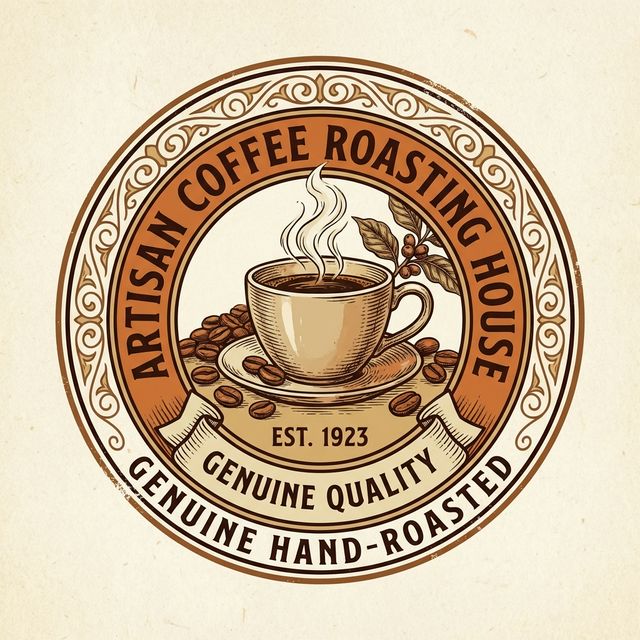
For artisan brands, a lovart prompt that evokes heritage and craftsmanship instantly communicates trust. The badge-style lovart logo generated by this lovart prompt is structured, warm, and print-ready — perfect for coffee shops, bakeries, craft breweries, and food packaging. This lovart prompt uses layout keywords to enforce a circular crest shape, preventing the AI from generating uncontained, freeform illustrations.
Copy this Lovart Prompt ↓
Vintage style circular badge logo for an artisan coffee roasting house, hand drawn detailed illustration of coffee beans and a steaming ceramic coffee cup, warm earthy tones like sepia and burnt orange, retro crest styling, cream background, established vibe.
"Circular badge" and "retro crest styling" are lovart prompt layout keywords that define the outer container of the design. Without them, a generic lovart prompt for a coffee logo might produce a scattered illustration with no clear shape boundary. The warm palette ("sepia", "burnt orange") in this lovart prompt locks the output to a coherent, professional visual identity — essential for a lovart logo that will appear on physical packaging, stamps, and clothing.
Use this lovart prompt for any brand that competes on authenticity and handcraft quality. The lovart logo style this lovart prompt generates is particularly well-suited for embroidery, screen printing, and traditional product labels — formats where a clean silhouette is a hard requirement.
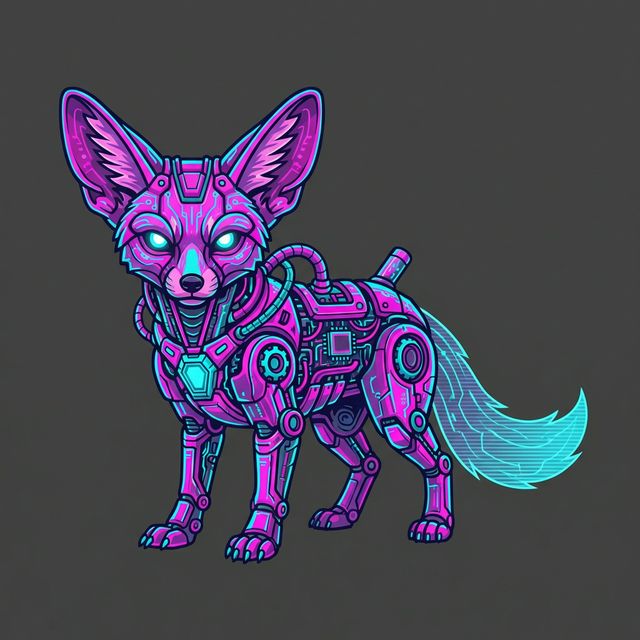
A great mascot character requires both artistic detail and commercial usability. This lovart prompt generates a neon-lit, mechanical animal mascot with intricate circuitry — perfect for gaming studios, esports brands, and crypto projects. The key innovation in this lovart prompt is the background isolation keyword, which makes the result immediately cut-out-ready for any design context.
Copy this Lovart Prompt ↓
Cyberpunk glowing robotic animal mascot character, vector illustration style, neon pink and hot cyan lighting, intricate circuitry and mechanical parts details, cyberpunk aesthetic, isolated over a solid dark background.
The phrase "isolated over a solid dark background" is the single most powerful modifier in this lovart prompt. It instructs Lovart's design agent to render the mascot in clear separation from a uniform background — making post-export cleanup trivial. "Intricate circuitry and mechanical parts details" pushes this lovart prompt beyond a simple cartoon and into premium character design territory. For a lovart prompt targeting mascot generation, specificity of character features is everything.
This lovart prompt excels for Discord server assets, Twitch stream overlays, esports team branding, merchandise prints, and NFT collections. To create a full character sheet from one lovart prompt session, append "front view, side view, back view" to generate multiple angles at once.
When designing custom game characters, RPG avatars, or indie story mascots, visual prompts produce far more cohesive results when grounded in a defined psychological archetype. Before generating visual assets, many narrative designers map out core character traits using specialized frameworks like the Soul Virtues Extractor (Undertale Soul Virtues Test) to extract underlying personality attributes, virtue balances, and moral alignments before converting them into visual prompt keywords.
Every effective lovart prompt follows the same core structure. Start with a clear subject (what is the design?), add a style (vector, hand-drawn, 3D render), specify a color palette (warm earth tones, neon gradient, monochrome), and end with a medium or use-case keyword (logo, badge, mascot character, poster). This four-part lovart prompt formula works across every design category Lovart supports.
For lovart logo creation specifically, always include the output format in your lovart prompt: "clean vector style" for logos, "transparent PNG" for web graphics, "print-ready CMYK" for physical merchandise. A lovart logo lovart prompt that includes the export format produces an asset that skips the post-processing step entirely — saving hours in production workflows.
Bookmark this page — we regularly publish new lovart prompt examples across industries including social media, packaging design, and editorial illustration. Each new lovart prompt template is tested for commercial readiness before publication, so you can copy and use them immediately in professional projects.
Prompt hub
Use this guide for structure, then move to the page that matches your task. The library is for examples, the generator is for assembling a custom prompt, and the brand kit page is for turning one brief into a wider identity system.
Use these as safe starting points, then replace brand, audience, color, format, and avoid fields. These are independent editorial examples, not official Lovart internal prompts.
Logo prompt 1
Minimalist geometric logo for a fintech app, secure vault symbol, navy and mint palette, clean vector style, no text, transparent background.
Logo prompt 2
Luxury skincare monogram logo, thin gold linework, soft ivory background, editorial spacing, no text, premium packaging ready.
Logo prompt 3
Friendly restaurant logo mark, fork and flame icon, terracotta and cream palette, flat vector style, square avatar crop.
Logo prompt 4
Gaming esports shield logo, lightning motif, electric blue and orange accents, bold vector mark, no tiny details.
Logo prompt 5
Eco wellness logo, stylized leaf and water droplet, sage green palette, calm minimal style, no medical claims.
Logo prompt 6
Creative agency abstract prism logo, cobalt and coral gradient, simple geometry, white background, no text.
Brand Kit prompt 7
Create a brand kit for a B2B SaaS launch, logo direction, color palette, typography scale, social post style, and landing page hero system.
Brand Kit prompt 8
Create a warm bakery brand kit with packaging labels, menu card, Instagram post style, cream paper texture, and cocoa accent colors.
Brand Kit prompt 9
Create a fitness coaching brand kit with bold typography, lime accent color, app badge, challenge poster, and social story templates.
Brand Kit prompt 10
Create a sustainable marketplace brand kit with recycled paper texture, forest green palette, simple icons, and packaging mockup.
Brand Kit prompt 11
Create a premium consulting brand kit with charcoal palette, restrained accent color, proposal cover, and LinkedIn banner style.
Brand Kit prompt 12
Create an event visual system for a tech meetup with modular grid, speaker card placeholders, badge, and social announcement.
Social Post prompt 13
Design a five-slide LinkedIn carousel explaining a new SaaS feature, clean UI cards, simple icons, and a clear final CTA.
Social Post prompt 14
Design an Instagram launch post for a skincare product, soft studio product image, headline area, and compliance-safe copy space.
Social Post prompt 15
Design a restaurant opening story post, warm lighting, menu highlight area, map placeholder, and no fake discount claims.
Social Post prompt 16
Design a podcast quote card with guest portrait placeholder, bold pull quote, episode number, and modern editorial layout.
Social Post prompt 17
Design a nonprofit impact update with respectful photography style, donor CTA, and empty fields for verified impact numbers.
Product Mockup prompt 18
Create a coffee bag packaging mockup, kraft paper texture, front and side views, warm shadows, and editable logo area.
Product Mockup prompt 19
Create a mobile app launch mockup with three phone screens, soft gradient backdrop, crisp UI cards, and app store preview crop.
Product Mockup prompt 20
Create a matte skincare bottle render, pearl background, soft studio lighting, hero image and vertical ad crop.
Product Mockup prompt 21
Create a book cover mockup on a clean desk, hardcover front cover, spine view, and readable hierarchy.
Product Mockup prompt 22
Create a SaaS dashboard mockup, dark UI, chart placeholders, desktop and tablet views, no real customer data.
Video Ad prompt 23
Create a six-frame storyboard for an app launch, UI zooms, benefit captions, final CTA screen, vertical short-form format.
Video Ad prompt 24
Create a brand kit reveal storyboard, logo to palette to typography to social assets, nine panels, no official endorsement claims.
Video Ad prompt 25
Create a restaurant opening ad storyboard, food closeups, location card, team welcome frame, warm local tone.
Video Ad prompt 26
Create a B2B webinar teaser storyboard, speaker card placeholder, agenda cards, registration CTA, LinkedIn ad format.
Poster prompt 27
Create a music event poster with abstract sound waves, bold type, high contrast, empty performer fields, print-ready layout.
Poster prompt 28
Create a museum exhibition poster with large negative space, archival color palette, title block, and invitation card variant.
Poster prompt 29
Create a hiring campaign poster for a startup, clean office visual, role cards, CTA area, and no salary promise.
Poster prompt 30
Create an online workshop poster with friendly illustration, module callouts, calm colors, and webinar cover crop.
Fallback link: watch on YouTube. This video is an operation reference only and does not verify pricing, API, or feature availability.
No. lovart.info is an independent guide site. Use the official Lovart site for product access and current terms.
Write a clear creative brief with goal, audience, style, format, and constraints. Do not search for leaked or hidden system prompts.
A useful agent prompt describes the design outcome and workflow, such as logo plus brand kit plus social assets. It is not a hidden internal instruction.
Treat public collections as inspiration only. Check dates, source identity, license, and whether examples can be reproduced.
You have the prompts. Now get the tool. Join 800,000+ creators building the future of design with Lovart AI.
Start Your Free Trial Now →